|
|
||||||||||||
 |
||||||||||||
|
||||||||||||
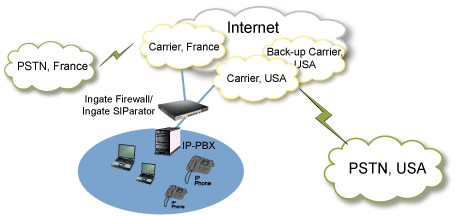
Secure SIP Trunking with Enterprise Session Border ControllersIngate SIParator®/Firewall® E-SBCs make SIP trunking secure, reliable and easy to deploy for enterprises using IP-PBX, UC and VoIP systems. Ingate connects a wide range of PBX platforms to SIP trunk providers while solving NAT traversal, interoperability, routing and security challenges. With Ingate, enterprises can replace legacy PSTN, ISDN BRI and PRI connections with modern SIP trunks while maintaining control, security and redundancy at the network edge. Connect Your IP-PBX to a SIP TrunkSIP trunking allows an enterprise IP-PBX or unified communications system to connect to the public telephone network through an Internet Telephony Service Provider (ITSP). This enables businesses to use VoIP for external calling while reducing dependency on traditional telephone lines and local PSTN gateways. Ingate E-SBCs sit at the enterprise edge and securely connect the IP-PBX to one or more SIP trunk providers. The solution handles SIP signaling, media routing, firewall traversal, authentication and carrier-specific requirements.
Why Use an SBC for SIP Trunking?A SIP trunk connects business voice traffic to external networks. Without the right protection, SIP traffic can be blocked by firewalls, fail because of NAT issues, or expose the enterprise to security and interoperability problems. An enterprise Session Border Controller protects and controls SIP traffic between the internal IP-PBX and the external SIP trunk provider. Ingate SIParator®/Firewall® E-SBCs provide the security, routing and SIP normalization needed for dependable SIP trunking.
Solving SIP NAT and Firewall TraversalIngate solves one of the most common SIP trunking problems: getting SIP and VoIP traffic through enterprise firewalls and NAT devices without compromising security. Traditional firewalls are not designed to understand SIP signaling or dynamically manage media ports for VoIP sessions. This can cause failed calls, one-way audio, registration issues and blocked SIP traffic. Ingate SIParator®/Firewall® E-SBCs use SIP proxy technology to control incoming and outgoing communication, route calls correctly and dynamically manage the media ports needed for voice and video traffic. Read more about SIP NAT traversal for VoIP and SIP trunks. Benefits of Enterprise SIP TrunkingSIP trunking gives enterprises a flexible and cost-efficient way to modernize business communications.
Advanced SIP Routing and InteroperabilitySIP trunk providers and IP-PBX vendors often use different SIP formats, authentication methods, numbering plans and routing requirements. These differences can create deployment problems even when both systems support SIP. Ingate E-SBCs normalize and route SIP traffic so that the IP-PBX and ITSP can communicate correctly. This includes support for carrier-specific requirements, authentication, dial plans, call routing and SIP header adaptation. See Ingate’s confirmed interoperability with leading IP-PBX vendors and ITSPs. Support for Multiple SIP TrunksIngate supports multiple SIP trunks and service providers, allowing enterprises to improve redundancy and optimize call routing. If one SIP trunk or provider becomes unavailable, calls can be routed through another provider. Multiple SIP trunks can also be used for least cost routing, international call optimization and business continuity. SIP Trunk Security with TLS and SRTPSIP trunking over the public Internet requires strong edge security. Ingate SIParator®/Firewall® E-SBCs protect SIP signaling and media traffic using SIP-aware security controls. Ingate supports Transport Layer Security (TLS) for SIP signaling and Secure RTP (SRTP) for voice and media encryption. This helps protect business communications from interception, unauthorized access and misuse. Easy SIP Trunk ConfigurationThe Ingate Startup Tool simplifies SIP trunk deployment by automatically configuring Ingate SIParator®/Firewall® products for selected IP-PBX systems and SIP trunk providers. The tool helps reduce installation time and creates a configuration designed for the enterprise’s own SIP trunking environment. Read more about the Ingate Startup Tool. FAQ: SIP Trunking and SBCsWhat is SIP trunking?SIP trunking is a VoIP service that connects an enterprise IP-PBX or UC system to the public telephone network through an Internet Telephony Service Provider. Why do enterprises need an SBC for SIP trunking?An SBC protects and controls SIP traffic between the enterprise network and the SIP trunk provider. It solves NAT traversal, security, interoperability and routing problems. What is SIP NAT traversal?SIP NAT traversal allows SIP signaling and media traffic to pass correctly through firewalls and NAT devices. Without it, calls may fail or experience one-way audio. Can Ingate connect to multiple SIP trunk providers?Yes. Ingate supports multiple SIP trunks and service providers for redundancy, failover and least cost routing. Does Ingate support SIP encryption?Yes. Ingate supports TLS for SIP signaling and SRTP for encrypted voice and media traffic. Which IP-PBX and ITSP platforms are supported?Ingate has confirmed interoperability with many leading IP-PBX vendors and ITSPs. See the full interoperability list here. For additional information about secure SIP trunking or to request a quote for an Ingate Session Border Controller, please contact sales@ingate.com. |
|
|||||||||||
| Support? | Helpdesk! | ||||||||||||
|
||||||||||||
| Isafjordsgatan 30C SE-164 40 Kista, Sweden | info@ingate.com | Contact us | Home | ||||||||||||
|
||||||||||||
| How Ingate uses cookies | ||||||||||||
|
||||||||||||